tl;dr: sharmaprateek/hugo-docfind - A zero-config, WebAssembly-powered search engine for Hugo.
Building a static site with Hugo is a joy. It’s fast, predictable, and the output is just files. You can host it anywhere - an S3 bucket, GitHub Pages, or a $5 VPS. Its as simple as it gets!
But there’s always one missing piece in the static puzzle: Search.
The Static Site Search Dilemma
Adding search to a static site has meant choosing between two options:
- Server Side Route: There are powerful server side search engines like Algolia, Elasticsearch, etc. But they require you to maintain a server, which adds complexity and cost. Also, they are not stateless.
- Bloated JS Route: Libraries like Lunr.js are great for small sites, but as your content grows, the search index explodes in size. Parsing a massive JSON file in JavaScript on the main thread kills your site’s performance.
I wanted something better. I wanted the power of a backend search engine with the simplicity of a static file.
Enter Microsoft DocFind
My “ah-ha” moment came when I read about Microsoft’s new search engine for Visual Studio Code documentation.
They faced the exact same problem. Their solution? Rust and WebAssembly.
They built DocFind, a search engine written in Rust that compiles to a compact WebAssembly (WASM) binary. It runs entirely in the user’s browser but delivers performance that feels like a native app.
- Zero Latency: No network round-trips for queries.
- Smart Ranking: It doesn’t just match keywords; it understands relevance (titles > headers > body).
- Tiny Footprint: The index is highly compressed, avoiding the multi-megabyte payloads of raw JSON.
It was exactly what I needed. But it wasn’t easy to drop into a Hugo site.
Why Not Search Every Word?
A common question is: “Why doesn’t it just search every single word on the page?”
The answer lies in the battle between Signal and Noise.
Indexing every occurrence of “the”, “and”, or “however” creates a massive index file that hurts performance. But more importantly, it dilutes the quality of search results. When a user searches, they are usually looking for a concept, a definition, or a heading - not just a text match.
DocFind solves this by being smarter than a simple grep:
- Keyword Extraction: It uses algorithms like RAKE to identify the most important words in a sentence.
- Title Prioritization: Matches in the page Title are weighted significantly higher than matches in the Body.
- Meaningful Indexing: By focusing on what matters, the index stays tiny (often smaller than a single image) and the results stay relevant.
Building Hugo-DocFind
Standing on the shoulders of giants, I built hugo-docfind to bridge this gap. I wanted to make integrating this technology as simple as adding a theme.
Here’s how it works under the hood:
1. Build Time: The Indexing Pipeline
The first step is getting your content out of Hugo. I didn’t want to parse HTML files externally.
Instead, I used Hugo’s Custom Output Formats. By adding just a few lines to hugo.toml, Hugo automatically generates a search.json file containing all posts and pages alongside the HTML build.
[outputs]
  home = ["HTML", "RSS", "SearchIndex"]

[outputFormats.SearchIndex]
  mediaType = "application/json"
  baseName = "search"
  isPlainText = true
Then, the DocFind binary kicks in to process this raw JSON into the highly-optimized index.
2. The “Double Split” Strategy
One of the coolest features of this implementation is Section-Level Indexing.
Most static search engines index the entire page as one blob. If you search for a term that appears at the bottom of a long guide, you get a link to the top of the page.
hugo-docfind is smarter. It uses a “Double Split” technique directly within the Hugo template to break pages into granular sections:
- Split by
<h2: This identifies the start of a content chunk. - Split by
</h2>: This isolates the header (allowing us to extract the ID and Title) from the body content.
{{- /* 1. Split content by the START of h2 tags */ -}}
{{- $chunks := split .Content "<h2" -}}

{{- /* ... inside the loop ... */ -}}

{{- /* Split by CLOSING h2 tag to isolate header from body */ -}}
{{- $subChunks := split $chunk "</h2>" -}}
This ensures that:
- HTML Attributes Don’t Leak: We don’t accidentally index
class="foo"orid="bar". - Deep Linking: Search results point directly to the relevant section (e.g.,
/docs/configuration/#advanced-settings). - High Relevance: A keyword match in a specific section boosts that specific section, not the whole page.
And the best part? It requires zero external dependencies. No Node.js scripts, no Python parsers. It’s just Go templating logic that happens instantly during the Hugo build.

3. Run Time: Zero-Latency Search
When a user searches, everything happens locally.
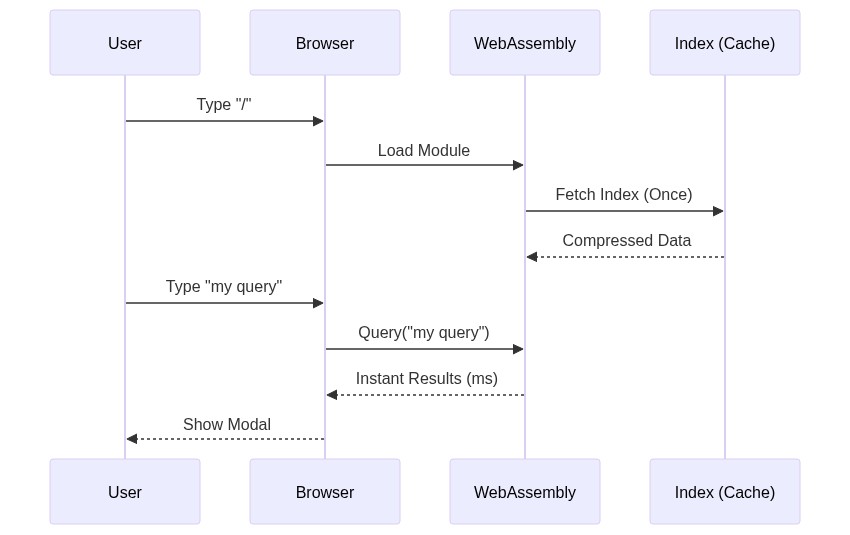
The result is magical. You get top-quality search on a site hosted in a simple S3 bucket. No servers, no APIs, no maintenance.
Automating with GitLab CI
To make this seamless, I integrated hugo-docfind into my GitLab CI pipeline. The goal: fully automated search index generation on every git push.
Here is how the pipeline flows:

- Standard Build: Run
hugoto generate the content, includingsearch.json. - DocFind Processing: The CI runner downloads the
docfindbinary and processessearch.json. - Asset Generation: DocFind outputs the optimized
docfind_bg.wasmanddocfind.jsassets. - Final Build: Hugo runs again (or copies the assets) to produce the final
public/folder ready for S3.
This means I never have to manually run a build script. I just write markdown, push to main, and the search updates automatically.
Why WebAssembly Fits Hugo
Hugo is the world’s fastest static site generator. It minimizes build times so you can focus on writing. WebAssembly does the same for the browser - it minimizes execution time so your users can focus on reading.
By moving the heavy lifting to Rust/WASM, we keep the JavaScript layer thin and the UI responsive. It’s a pragmatic use of “bleeding edge” tech to solve a very old problem.
Try It Yourself
This entire site is using the plugin right now.
Just hit / on your keyboard (and search for IAM or AWS).
That instant search modal? That’s Rust running in your browser.
I’ve published the module as open source so you can add it to your own projects. It includes a pre-configured modal, expandable navbar widget, and keyboard navigation support (Arrow keys + Enter).
Check it out on GitHub: sharmaprateek/hugo-docfind
Let’s keep our sites static, fast, and feature-rich.